
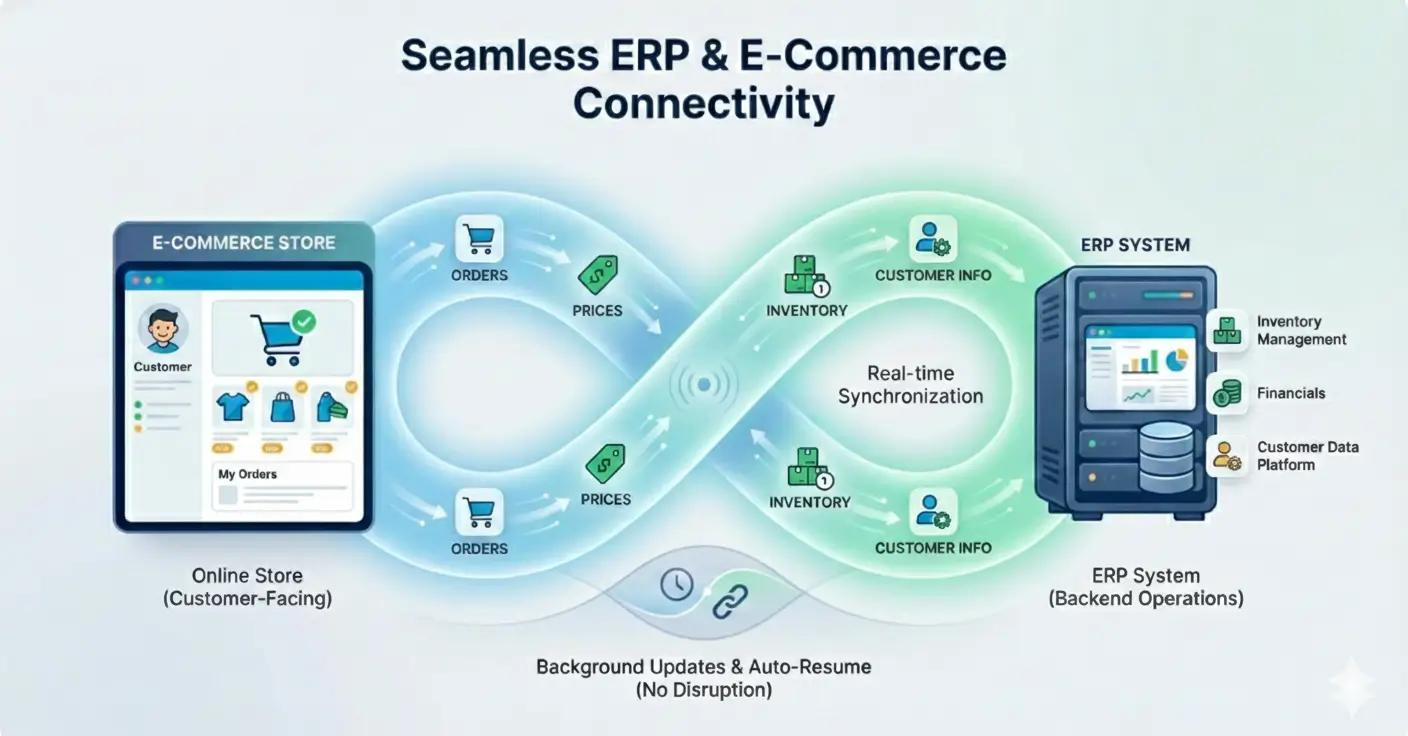
Think about the last time your team noticed that the stock count in Shopify didn't match what was physically in the warehouse. Or the morning someone realised that weekend orders hadn't made it into Tally. Or the customer who emailed asking where their order was and nobody could give them a straight answer because the shipping system showed something different from the order management system.
These moments tend to be treated as one-off problems. A sync that missed, a manual step that was forgotten, a system that had a bad day. The team fixes it and moves on.
But if they happen more than once, they aren't one-off problems. They're symptoms of a systemic integration issue and the cost of leaving them unaddressed compounds every month as order volume grows.
Here are seven specific signs that your eCommerce store has an integration problem, and what to do about each one.
Why eCommerce integration problems happen
Most integration problems don't start with a bad decision. They start with a growing business adding systems over time an ERP here, a POS there, a new warehouse management tool, a CRM for the sales team without a clear plan for how each system will communicate with the others.
The connections that exist are often batch syncs running on a schedule rather than real-time event-driven integrations. A batch sync that runs every hour creates a one-hour window where the systems disagree which is exactly when an oversell or a missed order can happen. And because these syncs run quietly in the background, failures often go unnoticed until a customer complains.
Seven signs your store has an integration problem
Your stock count in the store doesn't match your warehouse or ERP
This is the clearest and most common sign. If your eCommerce platform shows 45 units of a product and your warehouse or ERP shows 38, one of them is wrong and until a real-time integration fixes the gap, you have no reliable way to know which. Oversells happen in this gap. A customer orders the last unit, the order confirms, and then fulfilment discovers the warehouse doesn't have it.
The fix is a bidirectional real-time inventory sync between your store and your ERP or warehouse management system. Not a scheduled import an event-driven connection that updates both systems the moment stock changes anywhere in the chain.
Someone on your team manually re-enters data between systems every day
If a person's daily routine includes exporting orders from Shopify and entering them into Tally, or updating spreadsheets from your POS at the end of each day, or copying customer records from your store into your CRM that is an integration problem presented as a job description. Every manual step is a place where data can be entered incorrectly, delayed, or forgotten entirely. It's also an expensive way to do something software should do automatically.
Businesses with more than 30–50 daily orders typically find that this manual overhead consumes one to two hours of staff time per day - time that disappears from your accounting but shows up clearly in operational friction.
Orders take longer to process than they should
When an order placed on your store at 9am doesn't reach your warehouse system until 11am because the sync runs every two hours, that two-hour delay affects every step downstream pick and pack, shipping label generation, carrier handoff. At low order volumes, two hours is manageable. At higher volumes, or during peak events like sale days, it creates a backlog that can take days to clear. Real-time order transmission from your eCommerce platform to your warehouse or fulfilment system is the baseline for a functional operation not an enhancement.
Shipping tracking information is inaccurate or delayed
Customers who've placed an order check their tracking. If the tracking link doesn't update for 24 hours after the order shipped, or shows a different status than what your customer service team sees, or contains inaccurate carrier information that's an integration problem between your fulfilment system and your shipping carrier, or between your carrier and the tracking data fed back to your store. Each gap creates a customer service ticket. Multiply that by hundreds of orders and it becomes a meaningful operational cost.
Your accounting records and your store revenue don't reconcile cleanly
If month-end reconciliation between your Shopify revenue, your Tally or accounting system, and your actual bank deposits requires hours of manual matching and investigation the integration between your store and your accounting system isn't working properly. Partial refunds, multi-currency transactions, and payment gateway fee handling are common sources of discrepancy when the integration isn't built to handle them correctly. A properly built accounting integration handles all of these cases and produces clean records that reconcile without manual intervention.
Your customer service team can't give customers accurate information
When a customer calls asking about their order and the customer service agent has to check three different systems to get a complete answer that's an integration problem. The agent's CRM shows one thing. The order management system shows another. The shipping system shows a third. None of them are automatically in sync. A customer-facing service team working from incomplete or contradictory data makes mistakes, gives inconsistent answers, and takes longer to resolve issues. The solution is a unified view of customer and order data usually achieved by connecting the eCommerce platform, CRM, and fulfilment system through a common integration layer.
Integration failures go unnoticed until a customer reports a problem
This is the most dangerous sign, because it means your integration layer has no monitoring. A sync fails at 2am. Nobody notices. Orders from the previous night don't reach the warehouse. Customers start emailing the next morning asking where their confirmation is. The failure has been running for six hours before anyone knows about it. Properly built integrations include error handling, retry logic, and real-time alerting so that failures are caught and addressed by your operations team before they become customer-facing problems. If your current setup has no mechanism for detecting integration failures automatically, that's a significant operational risk.
How to identify and fix integration issues
The fastest way to check if your integrations are working is to compare the same data point across two systems right now. Does the inventory count in your store match your ERP for the same SKU? Does yesterday's order count in your platform match what your accounting system recorded? Consistent discrepancies between systems confirm an integration problem.
What a properly integrated eCommerce operation looks like
- Orders placed in the store reach the warehouse within seconds not hours
- Inventory updates in the ERP or warehouse push immediately back to the store
- Customer records in the CRM update automatically on every purchase
- Accounting entries are created from order data without manual re-entry
- Integration failures trigger automatic alerts before customers are affected
- Month-end reconciliation is a check, not a two-day investigation
Younifi Wellness: fixing fragile integrations that were costing revenue
Younifi Wellness came to Satyanam with a digital storefront that was losing customers not because of bad products or poor marketing, but because the integrations between the store and its fulfilment and inventory systems were unreliable. Orders were being confirmed that couldn't be fulfilled. Stock data was inconsistent. Customer experience was suffering from problems that were entirely backend invisible on the store but very visible to the people trying to buy from it. Satyanam rebuilt the integration layer with reliable API connections, proper error handling, and a CI/CD pipeline for stable, testable deployments. The result was a significantly more accurate operation and measurable revenue growth that followed directly from the reliability improvement.
Read the full Younifi Wellness case study →Integration problems are rarely dramatic. They don't announce themselves. They accumulate quietly as stock discrepancies that get manually corrected, orders that take slightly longer than they should, accounting records that almost reconcile, and support tickets from customers who got contradictory information from two people on the same team.
If three or more of the seven signs in this article describe something that happens regularly in your operation even if it's currently being managed manually that's worth investigating properly. The manual workarounds that hold the system together today become significantly more expensive as order volume increases.
The fix almost always exists. The question is whether you find it before or after it starts costing customers.
Think your eCommerce integrations might have a problem?
Satyanam builds and repairs eCommerce integrations for Shopify, nopCommerce, and WooCommerce stores connecting ERP systems, warehouse tools, CRM platforms, accounting software, POS systems, and shipping providers. We'll look at what you're running and tell you honestly where the gaps are.
Book a free integration consultation →Frequently asked questions